Venue software comparison

A Tripleseat alternative built for venue teams

If your team wants one connected place to manage inquiries, proposals, bookings, payments, and follow-up, see how Venuine fits the way your venue actually sells and runs events.
  • 30-minute walkthrough
  • Tailored to your venue type
  • No credit card required
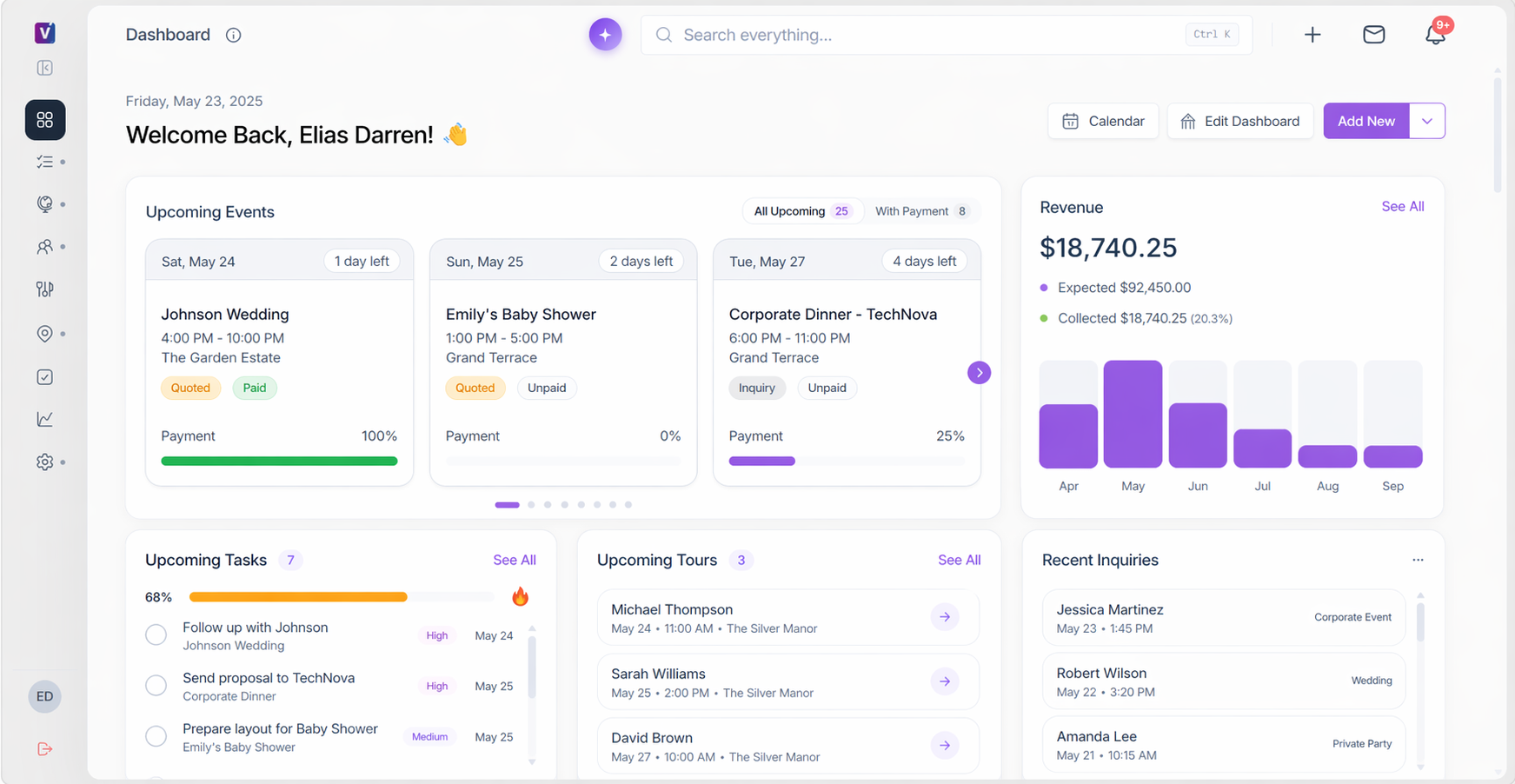
Venuine venue management dashboard showing upcoming events, revenue, tasks, and recent inquiries
One view from inquiry to event dayReal Venuine interface
Made for venuesKeep the event record, next action, and operating details connected.
Built for independent venues, hotels, banquet halls, and growing event businesses.
01
See a workflow using your venue type
02
Bring one real event to the walkthrough
03
Leave with clear next steps
Start with the buyer's job

Why Venuine is a stronger fit for venue teams

The right platform should fit the full journey from first inquiry to event day. Your team should be able to see what needs attention, build a proposal, secure the booking, collect payment, and hand clear details to operations without losing context between tools.

01

Respond while the lead is active

Bring website, email, phone, and team inquiries into one visible pipeline so the next action is clear.

02

Build proposals without starting over

Use event details, packages, services, space, and guest count to prepare a polished proposal faster.

03

Keep the booking connected

Move from conversation to proposal, contract, payment, and event details with the same record and shared context.

04

Give leaders one view

See what is booked, what needs attention, and where revenue is moving across spaces and events.

Fair feature comparison

Venuine vs. Tripleseat: what to compare

Both products cover core event-sales and venue-management work. Venuine's clearest wedge is a venue-specific workflow with AI-assisted execution and built-in floor-plan management. Compare both with the same real event and written package terms.

Use the table as a shortlist, then validate your exact workflow, integrations, and package terms.How these facts are sourced ↓
Comparison of Venuine and Tripleseat for venue teams
Decision areaVenuineTripleseat
Proposals + documents✓ AI-assisted proposalsRecommendations in about 60 seconds, e-signatures, quotes, and contracts.✓ Branded proposalsTemplate-based proposals, contracts, and banquet event orders with e-signatures.
Floor plans✓ Built-in floor-plan designerArrange tables, chairs, and furniture in Venuine without separate floor-plan software.✓ Floor-plan toolsManual 2D/3D floor-plan diagramming is available.
Lead capture✓ Pipeline + follow-upInquiry forms, shared pipeline, instant price calculator, and automated follow-ups.✓ Unified inquiry inboxLead capture with a unified inquiry inbox.
Bookings + payments✓ Connected booking recordCentral calendar, multi-day events, invoices, payments, packages, and services.✓ Booking + guest portalCentral bookings calendar and payment processing in the guest portal.
Client + team work✓ Event context across the teamContacts, tasks, SMS, calls, mobile alerts, and connected event context.✓ Client and task toolsClient portals, task management, contact management, and iOS/Android app.
Self-service + reach✓ Instant pricing pathInstant pricing from inquiry forms. Confirm any direct-booking requirement in your demo.✓ Distribution optionsDirect Book, event ticketing/registration, and Venue Marketplace listing.
Price + buying modelStarts at $89/monthConfirm the current billing period, included package, user or venue limits, setup fees, processing fees, and exclusions.Quote-based on its own siteConfirm current price, add-ons, payment terms, and document-service fees in writing.
Tripleseat is a capable platform.

It includes broad event-management capabilities and can be a strong fit for teams that need its feature breadth, packages, and add-ons.

Why venue teams choose Venuine.

Its case is a venue-specific workflow with AI-assisted proposals, built-in floor plans, recommendations, pricing responses, and follow-up in one connected system.

Comparison note: Information is based on public materials and Venuine product-owner inputs reviewed in September 2026. Product packages, integrations, pricing, and competitor features change; confirm the details that matter to your venue before buying.
Product proof

See the work between inquiry and event day

Venuine brings the sales and operating details around each event into one connected view. Your team can move faster without giving up visibility.
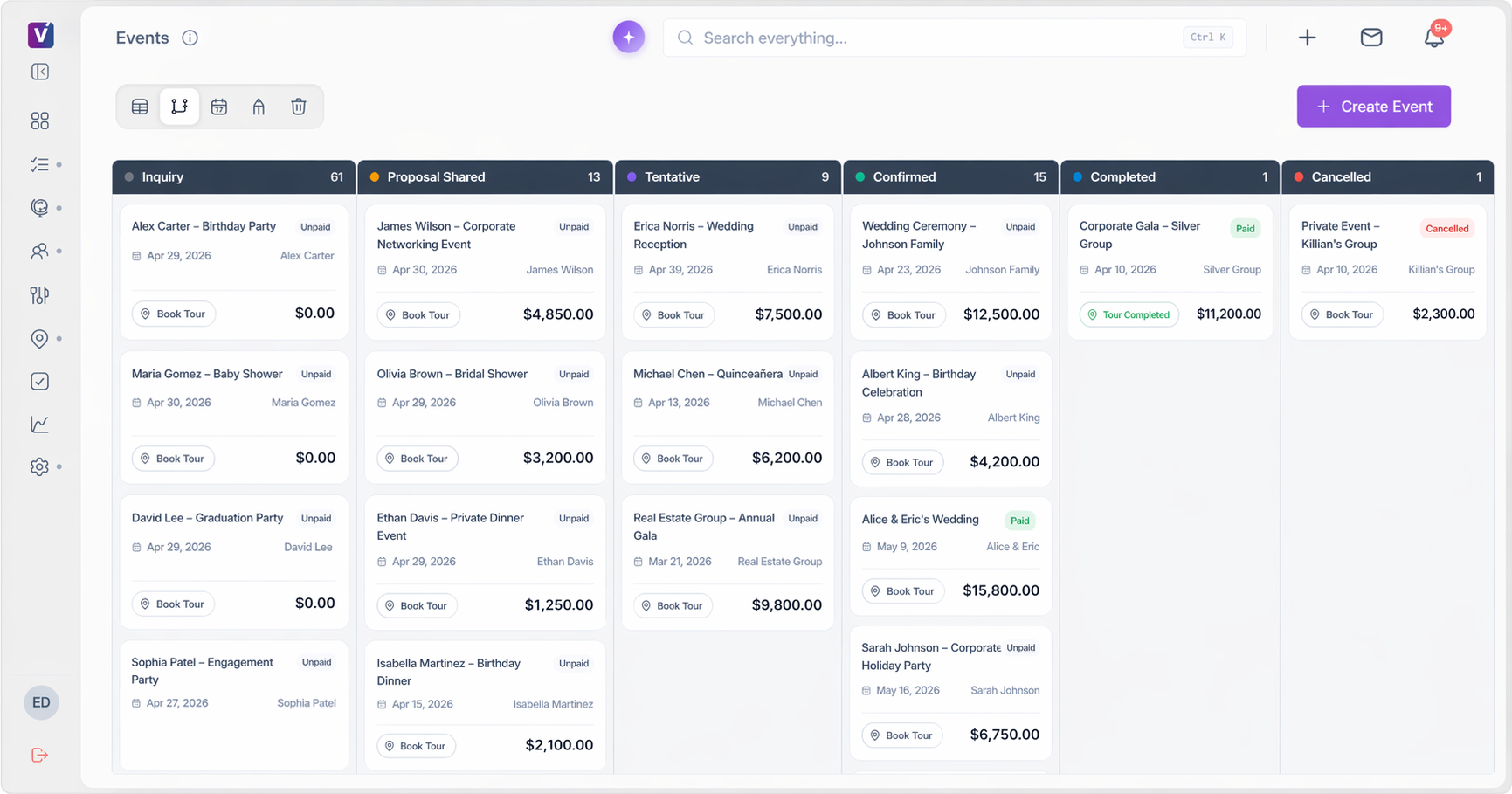
Venuine event pipeline showing inquiries, proposals, tentative bookings, confirmed events, and completed events
01 · Capture and qualify

Make the next action visible

Bring inquiries into a shared pipeline. Keep contact, event, venue, and next-step details together so leads do not disappear between inboxes.
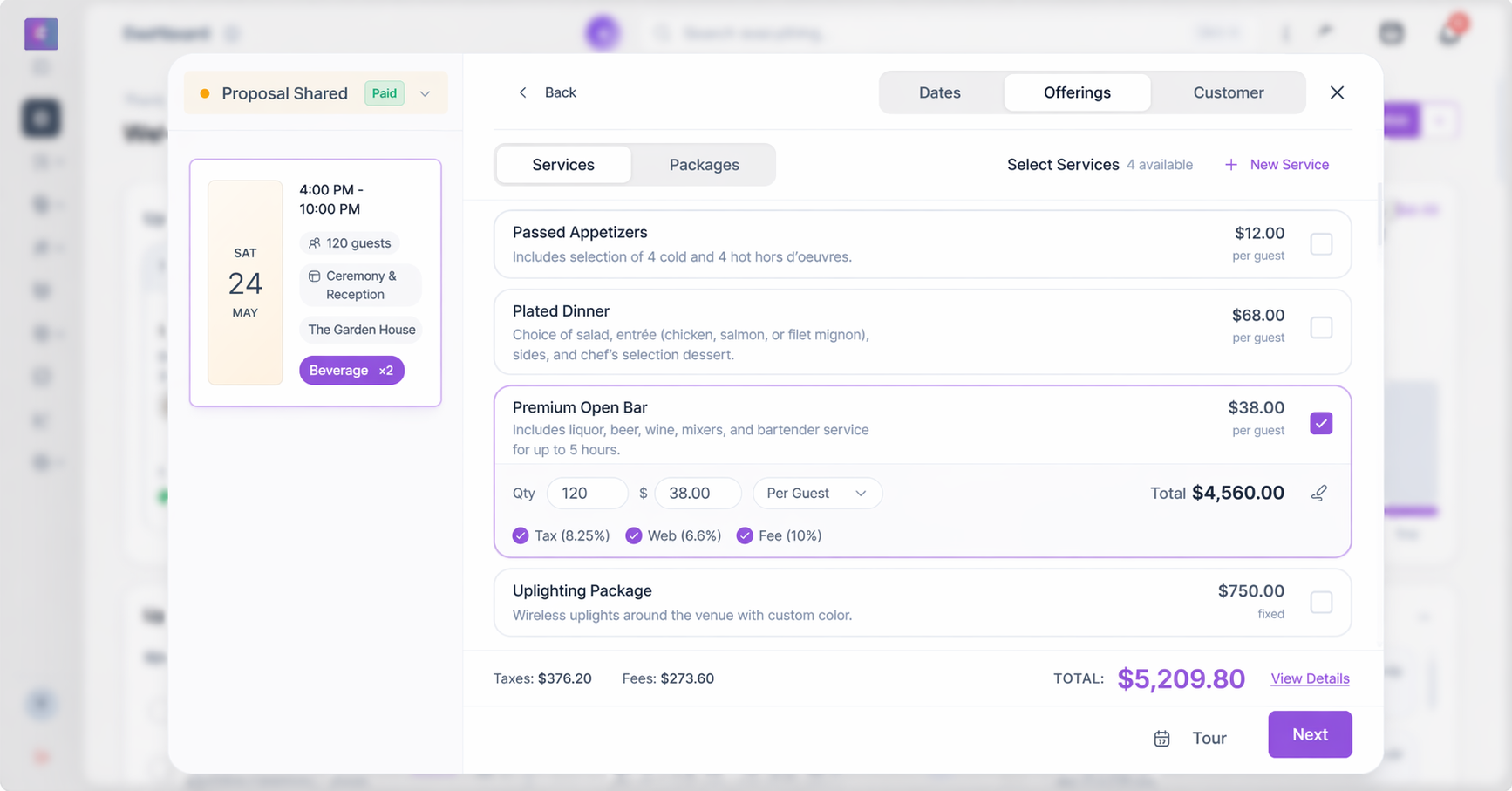
Venuine proposal builder showing event details, packages, services, quantities, and pricing
02 · Build and send

Turn event details into a proposal

Use packages, services, spaces, guest count, and Veni AI recommendations to prepare a clear proposal for review.

Venuine dashboard showing booked events, payment progress, tasks, and recent inquiries
03 · Book and hand off

Keep the booking operationally ready

Keep signatures, invoices, payments, calendar details, floor plans, and team tasks connected to the booking.

Best-fit guide

Which team is Venuine a fit for?

The right choice depends on your venue type, package structure, integrations, and process. Use these signals to decide what to validate in a demo.

Choose Venuine if you want to…

  • Run inquiries, proposals, bookings, payments, floor plans, and handoff in one venue-specific workflow.
  • Give a small or growing team one clear pipeline and next action.
  • Use AI-assisted proposals, recommendations, pricing responses, and follow-up to reduce repetitive work.
  • Support independent venues, banquet halls, hotels, or multi-space properties with configurable packages.
  • See how the platform handles one real event before you commit.

Validate another option if you need…

  • A specific integration, marketplace, hotel workflow, reporting model, or mobile capability that must be confirmed first.
  • A large organization-wide rollout with requirements outside the package you will use.
  • Direct-booking, ticketing, registration, or distribution features that are central to your sales motion.
  • A migration or implementation commitment that has not yet been confirmed in writing.
  • To compare current package and add-on terms side by side before selecting a vendor.
Switching without guesswork

See what moving to Venuine would involve

A software switch should be planned around your live pipeline and upcoming events. In a tailored demo, Venuine can map your current process and show the workflow your team would use.

01

Map

Review your inquiry sources, sales stages, packages, spaces, payment flow, and team roles.

02

Configure

Confirm the features, integrations, templates, migration support, and package your venue needs.

03

Validate

Run a real event through the proposed setup before committing to a rollout plan.

Bring evidence to the decision

What venue teams should be able to prove before buying

Use one real inquiry and one real event to test the full path. A good comparison is specific enough for the people who sell, operate, and lead the venue.

Bring one real event to your demo

See how Venuine would handle your inquiry, proposal, floor plan, payment, and team handoff in a 30-minute walkthrough tailored to your venue.

Request a tailored demo
  • A new inquiry reaches the right person with a clear next action.
  • A proposal can be built, revised, signed, and paid without duplicate entry.
  • Availability, layouts, client communication, and event details stay connected.
  • Owners can see pipeline, bookings, and revenue status without manual reporting.
Questions buyers ask

Tripleseat alternative FAQs

Get the short answer, then use the demo to validate the details that are unique to your venue.

What is a good alternative to Tripleseat for event venues?
Venuine is an option for venue teams that want inquiries, proposals, bookings, payments, floor plans, client communication, and event handoff in one connected workflow. The right choice depends on your venue type, package, integrations, and process.
How is Venuine different from Tripleseat?
Venuine emphasizes a venue-specific workflow, AI-assisted proposals, and a built-in floor-plan designer. Tripleseat publicly offers a core event platform plus packages and add-ons, including Direct Book, Floor Plans, and a Hotels offering. Compare both using the same real event and written quotes.
Does Venuine support floor plans?
Yes. Venuine includes a built-in floor-plan designer for arranging tables, chairs, and furniture inside the platform, without separate floor-plan software.
Can Venuine support hotels or multiple venues?
Venuine offers multi-day event and hotel room-block capabilities, and its product packages can be configured by venue. Confirm your required integrations, reporting, and location setup during the demo.
How much does Venuine cost?
Venuine starts at $89/month. Confirm the current billing period, included package, user or venue limits, setup fees, processing fees, and exclusions so you can compare like for like.
Can Venuine move data from another platform?
Migration depends on the data, format, integrations, and implementation scope. During the demo, identify what can be imported, who prepares it, what must be recreated, and how live events will be protected during the transition.
What happens after I request a demo?
Venuine will respond within one business day. The demo is a 30-minute, no-pressure walkthrough tailored to your venue type, and no credit card is required.
Is Venuine affiliated with Tripleseat?
No. Venuine is an independent venue-management platform and is not affiliated with or endorsed by Tripleseat.
Make the comparison concrete

See whether Venuine fits your venue

Bring your current workflow and one real event. We will show how Venuine can support your inquiry, proposal, booking, payment, floor-plan, and team-handoff process.

Tailored to your venueNo pressureNo credit card required
See Venuine with your workflowRequest a demo