Slow replies lose good dates
Give your team a clear place to assign inquiries, capture the important details, and keep follow-up moving while the lead is still evaluating venues.
Venuine gives independent and growing venues one clear workflow for lead response, proposals, contracts, payments, client communication, and event handoff—so your team can spend less time reconstructing a booking and more time closing the right events.
Built for the details venue teams manage every day: inquiries, dates, spaces, packages, people, payments, and promises.
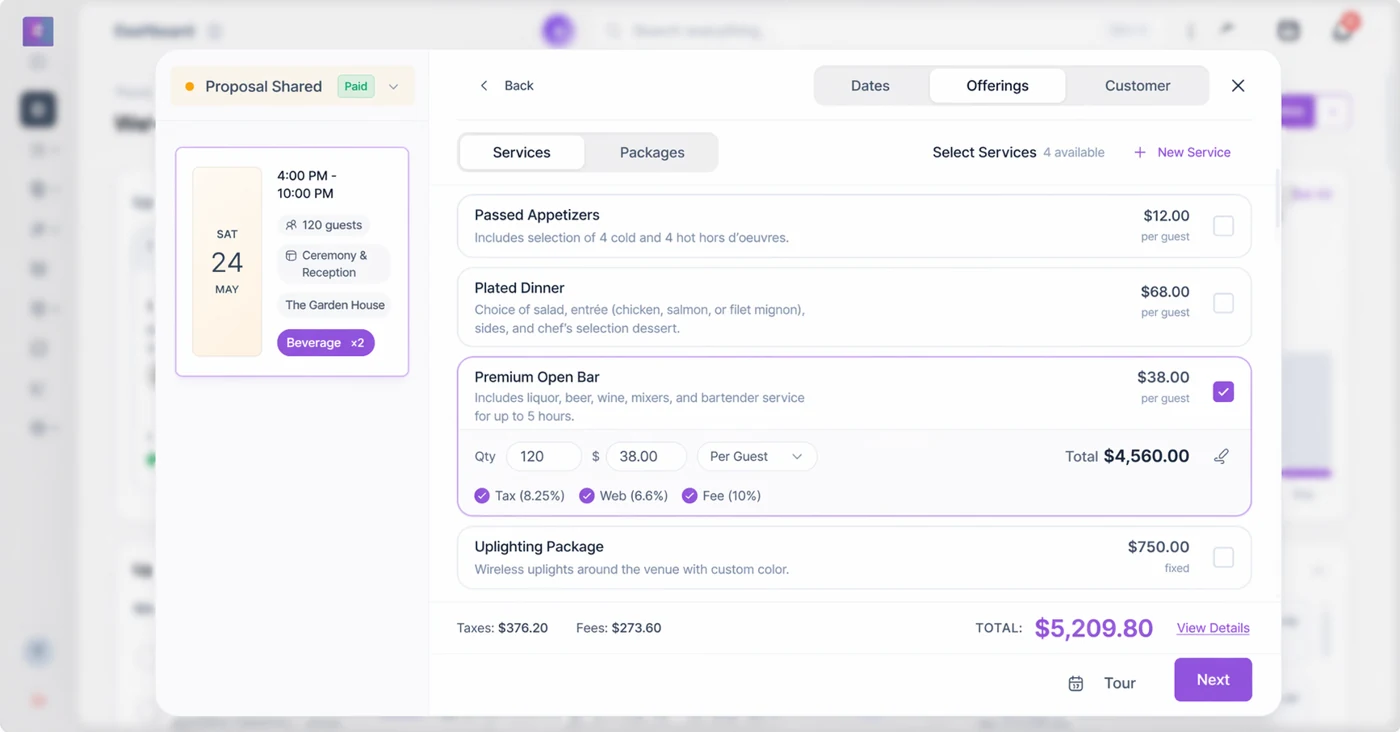
Start with a lead's date, guest count, and space. Add packages or individual services with per-guest and fixed prices. Review the totals before sending an offer the client can act on.
The screen shown here uses sample event data. In a demo, bring one of your real packages and ask us to build it, change the guest count, and show how the updated details reach the booking record.
The expensive problem is usually not a missing feature. It is the gap between the inquiry inbox, the proposal, the calendar, the payment record, and the event-day handoff.
Give your team a clear place to assign inquiries, capture the important details, and keep follow-up moving while the lead is still evaluating venues.
Keep package, space, pricing, and client details connected so a polished proposal is easier to build and less likely to contain yesterday’s information.
Move the booking forward with a shared record of what was promised, what was paid, what is due, and what the event team needs next.
Venuine connects the commercial work of winning a booking with the operational work of delivering it.
Collect the date, event type, guest count, budget, space needs, and next action in a consistent lead record.
Organize follow-up so your team can prioritize viable dates, high-fit events, and leads that need a human answer.
Bring the venue story, package details, pricing, and next steps together in a client-ready proposal.
Keep contracts, signatures, deposits, payment status, and booking details connected to the opportunity.
Give the team a current view of the event details, documents, timing, and responsibilities before the day arrives.
Start with the parts of the workflow that create the most friction today, then expand as your team is ready.
Keep inquiries, owners, notes, next steps, and communication history together instead of relying on memory and scattered inboxes.
Move from a qualified inquiry to a clear proposal, contract, and signature path without recreating the booking from scratch.
Give the team a better view of dates, spaces, and layouts so the client conversation reflects what the venue can actually deliver.
Make payment status, client actions, documents, and updates easier to follow from the first commitment through the final balance.
Reduce the “what did we promise?” moment by carrying the important commercial details into the operational view.
Use consistent booking data to understand pipeline health, follow-up activity, conversion friction, and revenue opportunities.
The workflow stays connected, but the conversation changes by venue type.
Make tours, packages, dates, proposals, deposits, and client communication easier to coordinate.
Keep event details, services, payments, and handoffs organized across a high-volume calendar.
Respond to different event types without losing visibility into rooms, resources, packages, and next steps.
Evaluate the workflow alongside your property, accounting, permissions, and multi-team integration requirements.
Many platforms sound similar because every venue needs a calendar, a CRM, and payments. Venuine stands out when your priority is a practical, connected path from a new inquiry to a booking your team can deliver confidently.
It can connect work that often lives across an inbox, spreadsheet, calendar, proposal template, payment tracker, and shared folder. The right scope depends on your venue and existing tools.
Venuine is aimed at independent and growing venues that want a repeatable inquiry-to-booking workflow without carrying a large, disconnected software stack.
Yes, the workflow can support different event types. During a demo, test your own packages, spaces, payment rules, and operational handoff rather than relying on a generic example.
Bring one real inquiry, your availability rules, a proposal, a contract, a payment schedule, and the event details your operations team needs. That makes fit much easier to judge.

Use a real inquiry and a real booking process. We’ll show you where Venuine can reduce friction and where you should keep your existing tools.
Venue management software connects the work of selling and delivering events: capturing inquiries, checking dates and spaces, preparing proposals, managing contracts and payments, communicating with clients, and handing agreed details to the team. It is useful when that information is otherwise spread across inboxes, spreadsheets, calendars, and documents.
A venue CRM focuses on the client relationship and sales pipeline. A booking system focuses on dates, spaces, and reservation status. An event workflow connects those decisions to the package, payment milestones, floor plan, and operational brief. Use your own booking process to decide which capabilities you need, and confirm what is included in your selected plan.
Follow the parts of an event that matter to your team, from the first inquiry to the room setup. Compare the product, review plans, and bring your own booking process to a demo.
Event venue management software helps a venue run the work between a new inquiry and event day: availability, client details, proposals, contracts, payment milestones, room planning, and the operational handoff. The useful system keeps those decisions connected rather than asking the team to rebuild the event across separate tools.
Evaluate the complete workflow with one of your real inquiries. Compare venue software or request a Venuine workflow demo.