Independent and growing venues
Prioritize fast inquiry response, reusable proposals, availability, contracts, payments, and a client experience your team can run without an implementation department.

THE 2026 VENUE SOFTWARE BUYER’S GUIDE
The right platform should help your team respond to inquiries, send proposals, collect deposits, and hand off every booking cleanly. This guide compares the leading approaches by venue type, workflow coverage, proof, and implementation fit.
Last reviewed October 27, 2026 · Public product information should be confirmed with each vendor.
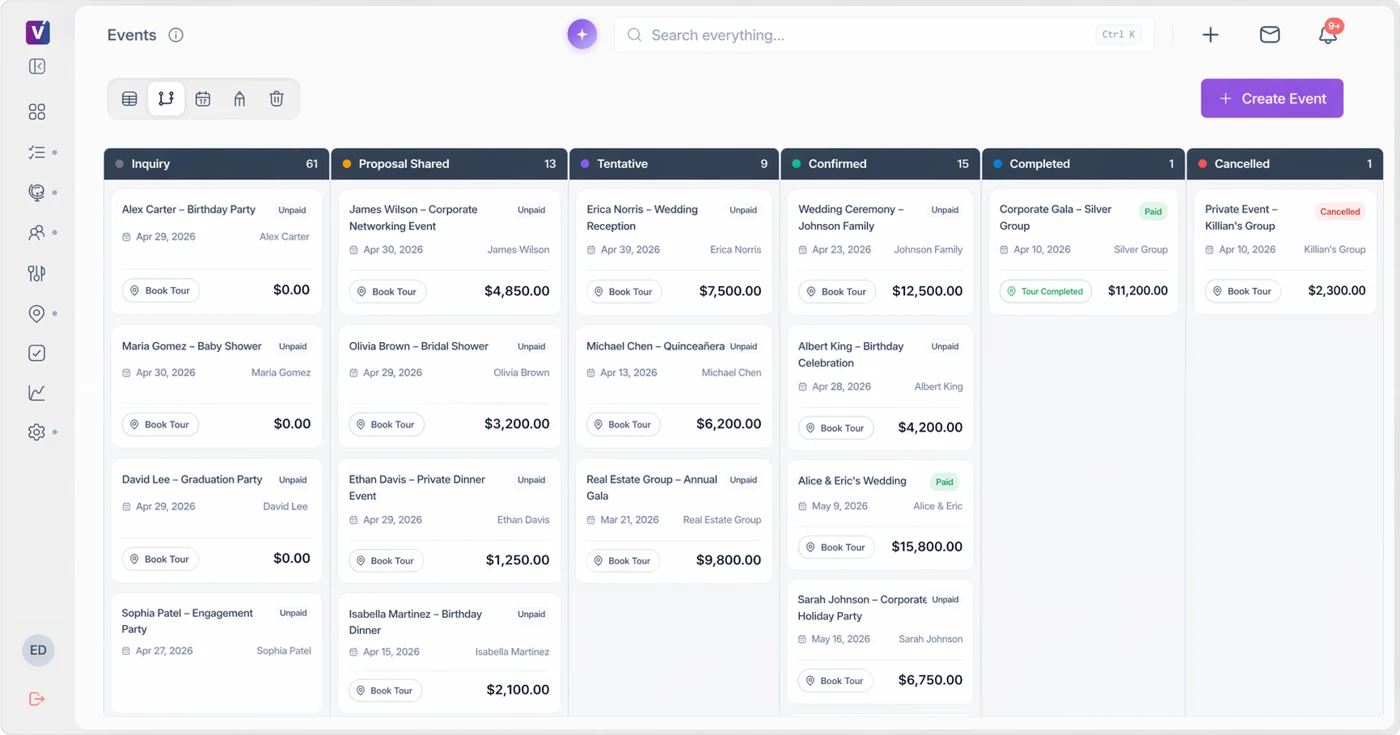
“Best” depends on your sales motion. A hotel with room blocks and a multi-property team has different requirements from an independent wedding venue trying to follow up faster.
Prioritize fast inquiry response, reusable proposals, availability, contracts, payments, and a client experience your team can run without an implementation department.
Validate room blocks, PMS or accounting integrations, permissions, multi-property reporting, and the handoff between sales, catering, and operations.
Look for complex space and resource scheduling, BEOs, staffing, service orders, forecasting, and reporting across many concurrent events.
Venue management software, also called event venue software or venue booking software, helps teams manage inquiries, event dates, proposals, payments, and operations. The table is a starting point, not a paid ranking. “Best fit” reflects the market positioning and public product information reviewed October 27, 2026. Confirm the exact workflow, integration, and pricing in a demo.
| Platform | Audience and buying task | Published price basis | Documented workflow | Detailed comparison |
|---|---|---|---|---|
| Venuine | Independent event venues comparing a connected sales and booking workflow | Starter: $112 monthly or $1,068 yearly ($89/month equivalent); 3 users, 1 venue. | Lead management, proposals, contracts, payments, and event handoff. Floor-plan and 3D tools are in Advanced. | Explore Venuine |
| Perfect Venue | Private events, group dining, and hospitality groups | Professional: $239/month/location or $199/month/location billed annually. | Publishes unlimited users, AI replies, guest booking tools, proposals and BEOs. Floor Plans is an add-on. | Venuine vs Perfect Venue |
| Tripleseat | Hospitality venues that need the core platform and selected additional packages | Published starting price: $375/venue/month; add-ons are priced separately. | Publishes inquiry capture, documents, BEOs, payments, Floor Plans, Direct Book and a Hotels offering. | Venuine vs Tripleseat |
| Planning Pod | Venues evaluating a broad booking, sales, and operational toolkit | Request a current quote for the required configuration. | Publishes bookings, CRM, floor plans, BEOs, equipment tools, Adyen payments and reporting. | Venuine vs Planning Pod |
| Releventful | Venues comparing sales, planning, staffing, and AI workflows | Core advertises a $150/month starting price; confirm setup and AI configuration. | Publishes CRM, planning, payments, inventory, staffing and AI. Its layout page describes Cvent and Planur connections. | Venuine vs Releventful |
Vendor material reviewed October 27, 2026: Perfect Venue pricing, Perfect Venue product, Tripleseat packages, Tripleseat documents, Planning Pod features, Releventful pricing, and Venuine plans. Entry prices cover different scopes; verify taxes, processing, setup, users, locations, modules, and billing terms. Venuine publishes this comparison.
Deciding whether to start with a free tool? Review free versus paid venue software before comparing the total cost of your shortlist.
An event venue CRM should connect the sales conversation to the operational details staff use later. These sample Venuine screens show two parts to test in any venue booking software demo: building a proposal from event details and preparing a floor plan for the team.
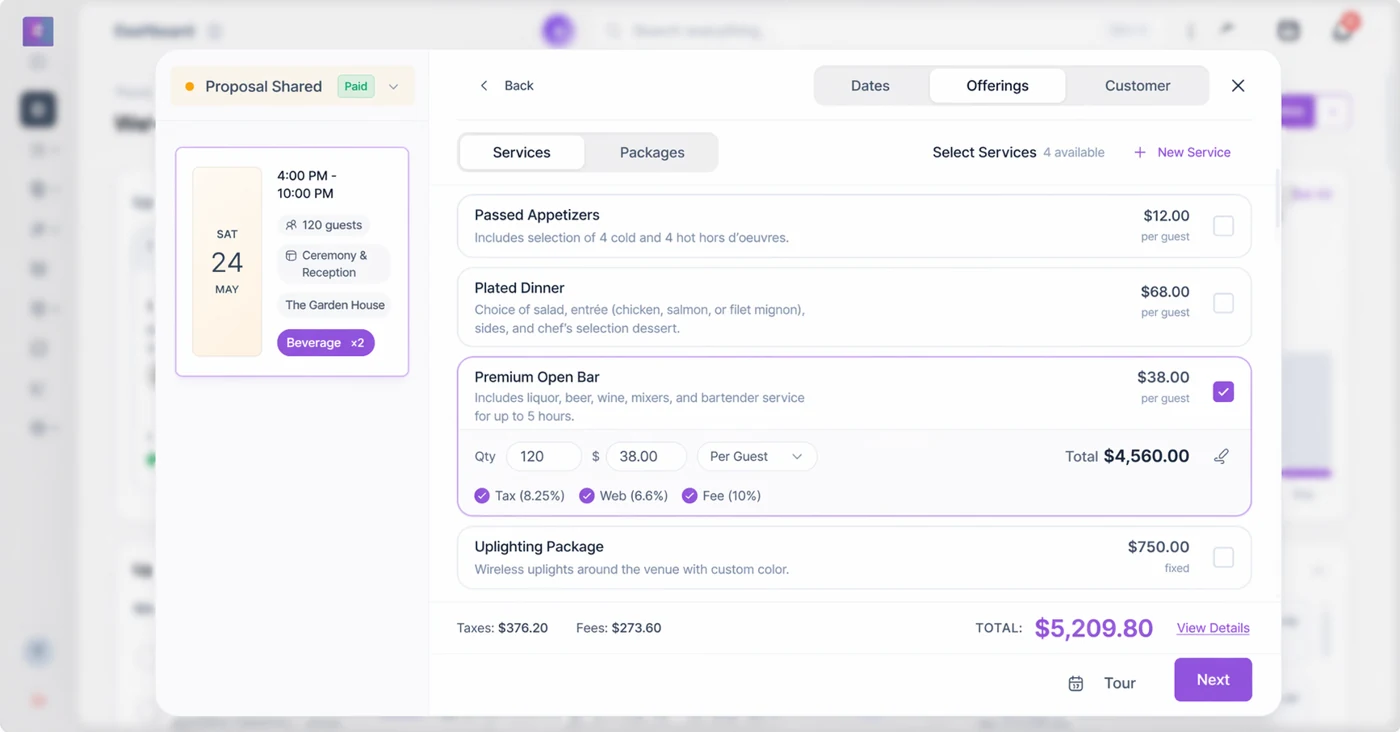
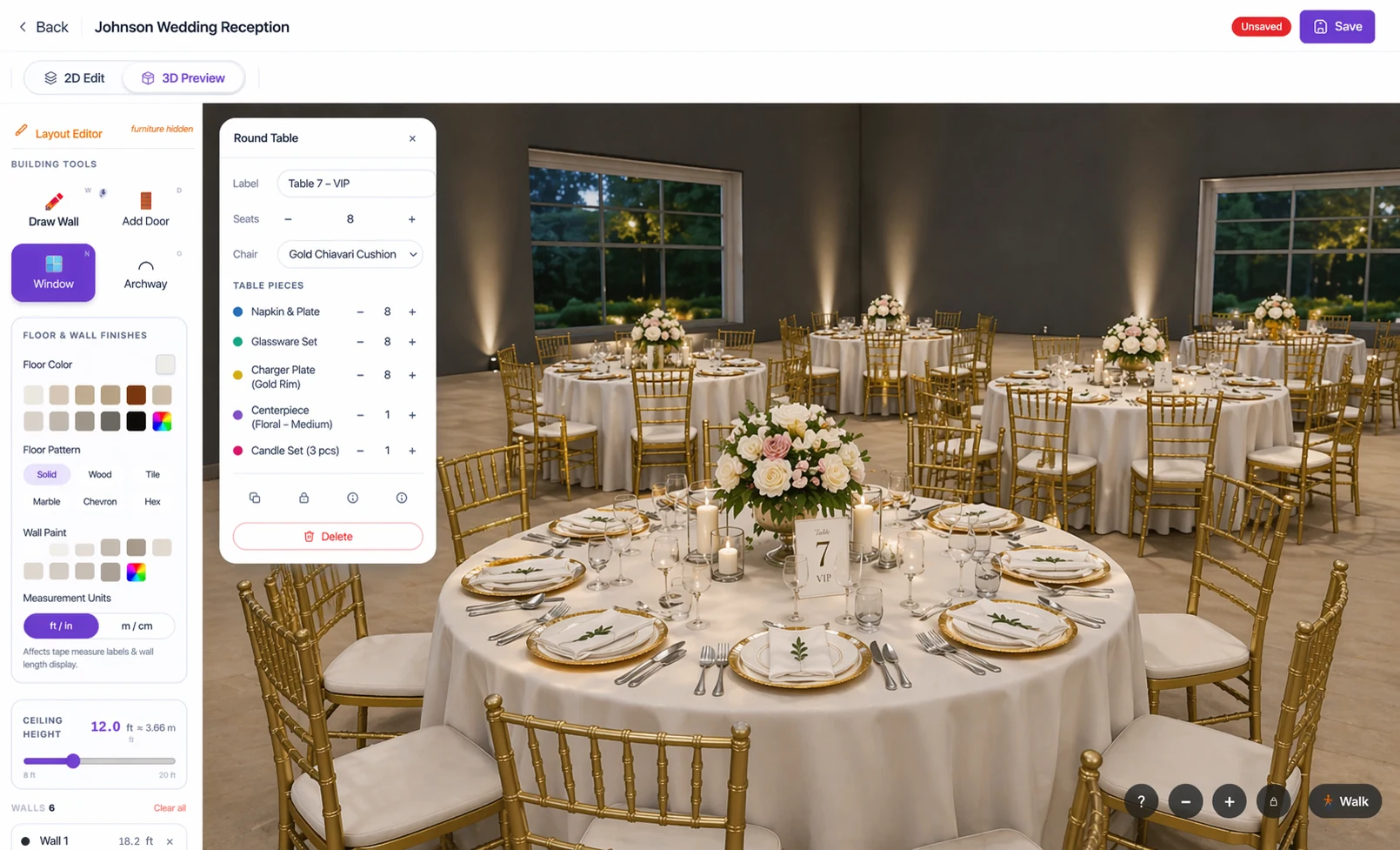
Venuine is built around the path from inquiry to proposal, contract, payment, and event-day visibility for independent and growing venues. The strongest way to evaluate it is a focused walkthrough using your real package structure, follow-up process, and calendar rules.
Before choosing any vendor, ask for a sample proposal, an integration list, migration details, support response expectations, and a transparent explanation of what is included in the plan.
See how Venuine fits your venue →There is no universal winner. The best option is the one that matches your venue type, sales volume, operational complexity, integrations, and team capacity. Use the comparison above to create a shortlist, then test your real workflow.
It can be if missed follow-up, manual proposals, scheduling conflicts, or payment chasing are costing time or bookings. Start with the workflows that create the most friction and measure them before and after implementation.
Ask the vendor to demonstrate a new inquiry, availability check, proposal, contract, deposit, client update, and event handoff using your terminology. Also ask what requires configuration, an integration, or a manual workaround.
Choose broad functionality when you truly need many departments and integrations. Choose a focused venue tool when adoption speed, clarity, and a tight inquiry-to-booking workflow matter more than a long feature list.
Bring your current inquiry and booking process to a Venuine walkthrough.
This guide is published by Venuine, one of the platforms listed. It is an editorial shortlist, not an independent award, review aggregate, or result of testing every product. Start with the platform’s documented audience, then validate the workflows your venue needs using live demos and equivalent-scope quotes. A broad feature list does not establish that a tool will fit your team.
Use a single anonymized event in each demo: capture the inquiry, check availability, build a package proposal, change the guest count, follow the contract and deposit, and review the room setup and operational handoff. Score whether each step works as shown, needs configuration, depends on an external tool, or remains unverified. Write down the evidence and who will own the workflow after rollout.
Download the free venue software demo scorecard (CSV). Open it in a spreadsheet, add your must-have requirements, and record the answers from each provider. It includes space for costs, migration, support, permissions, client experience, and implementation details.
Venuine’s floor-plan designer is built in. Releventful’s current floor-planning page describes connecting layouts created in Cvent Event Diagramming or Planur. Its AI overview also describes multiple AI workflows, so AI alone should not be presented as unique to Venuine. See the sourced Venuine vs Releventful comparison, reviewed October 27, 2026, for the practical differences and plan caveats.
Venuine’s published plans start at $89/month billed annually. Releventful’s published Core plan starts at $150/month. Those entry prices do not represent identical packages. Include setup, users, locations, integrations, AI usage, payment processing, and any separate floor-planning provider in your evaluation. Ask each vendor to confirm the billing term, included scope, and cancellation conditions.