Home / Venue management software comparison

THE 2026 VENUE SOFTWARE COMPARISON

Venue management software comparison for 2026

Compare the platforms venue teams actually consider by sales workflow, operations, payments, integrations, implementation, and fit. Use this page to build a shortlist; use a live demo to verify the details that matter to your venue.

Reviewed October 2026 · Based on the vendors' linked public product pages. Features and pricing can change, so confirm them directly before buying.

FROM INQUIRY TO EVENT DAY
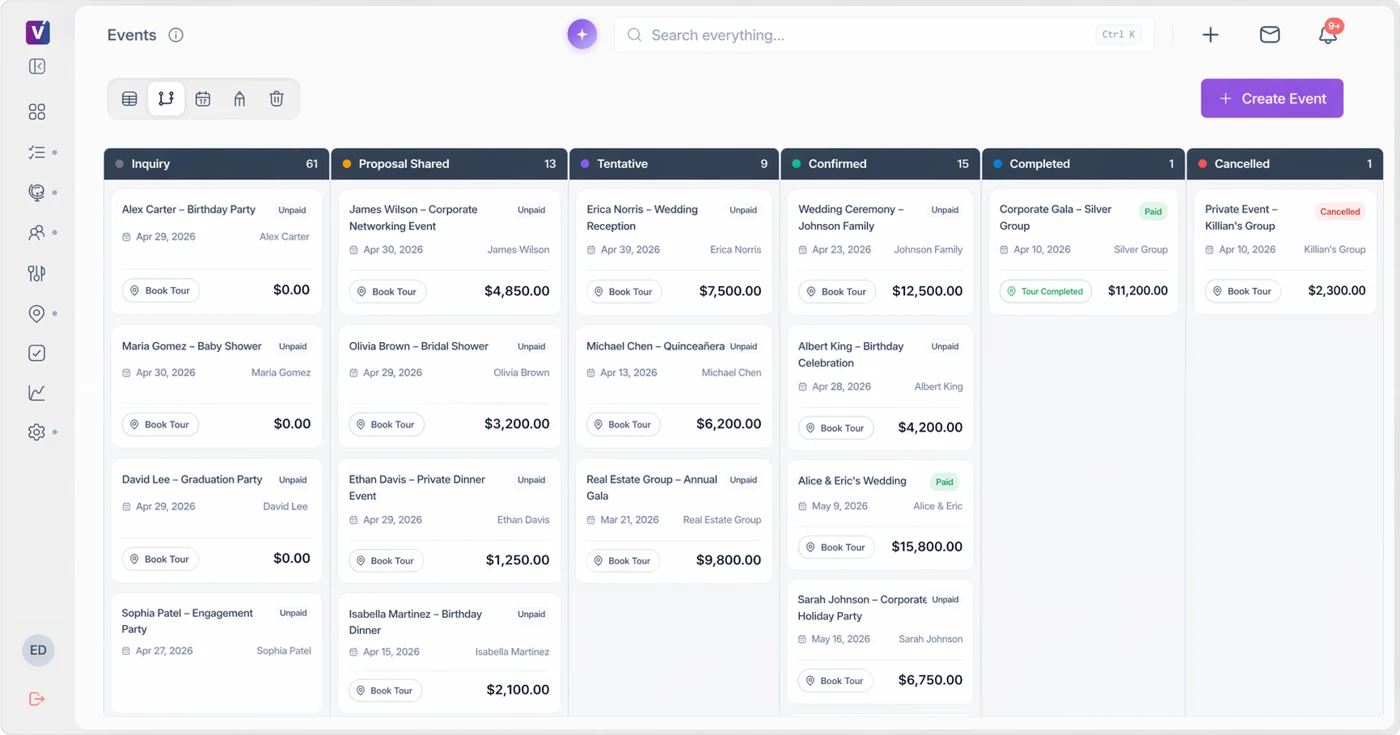
Venuine venue CRM pipeline showing sample inquiries and booking stages
See how the workflow fits.Compare leads, proposals, payments, and event handoff.
Venuine product preview · Sample data
How this comparison works: Venuine publishes this guide and is included in it. The table describes publicly documented workflows; it is not an independent award or a paid ranking. “Confirm” means the workflow or commercial detail should be tested in a demo or contract review.

Feature and fit matrix

PlatformCRM and lead handlingDocuments and BEOsFloor planningPaymentsPlan scope to compareDetailed review
VenuineEvent pipeline and lead follow-upPackages, quantities, proposal and contract workflowBuilt-in designer and 3D tools in AdvancedPayment processing listed in active plans; confirm methods and fees3 users in public packages; 1 venue in Starter/Pro, 2 in AdvancedProduct features
Perfect VenueInquiries and AI-assisted repliesProposals, e-signatures and generated BEOsFloor Plans add-onCard fees differ by tier; ACH listed on Premium and EnterprisePer-location pricing; unlimited users publishedPerfect Venue comparison
TripleseatInquiry capture and hospitality sales workflowEvent-linked proposals, contracts and BEOs2D and 3D Floor Plans package/add-onPublishes payment and billing workflowsCore starts at $375/venue/month; unlimited users; add-ons priced separatelyTripleseat comparison
Planning PodCRM, lead intake and pipeline automationProposals with e-signatures and BEOsLists floor plans and space layoutsDocuments integrated Adyen paymentsObtain a current quote for required modules, users and locationsPlanning Pod comparison
ReleventfulCRM, sales workflows and AI Sales AssistProposals, contracts and BEOsDescribes Cvent Event Diagramming and Planur connectionsInvoices and payment schedules; confirm eligibility and feesCore starts at $150/month; confirm AI configuration, usage and setupReleventful comparison

Vendor material reviewed October 27, 2026: Perfect Venue pricing, Perfect Venue product, Tripleseat packages, Tripleseat documents, Planning Pod features, Releventful pricing, and Venuine plans. Entry prices cover different scopes; verify taxes, processing, setup, users, locations, modules, and billing terms. Venuine publishes this comparison.

Score your shortlist with the same questions

Caterease comparison resources

If Caterease is on your shortlist, review the buyer questions for a Caterease alternative for venues and the focused Venuine vs Caterease comparison. Test the workflow with a real event inquiry and confirm the exact documents, payments, integrations, and handoff details your team needs.

More venue software buyer guides

Use these guides alongside the comparison matrix when you are defining requirements: free vs. paid venue management software, venue automation software, and venue reporting software. Each guide explains the workflow questions to test with your own inquiry, event details, and reporting needs.

Where Venuine fits

A focused path from inquiry to booked event

Venuine is designed for independent and growing venues that need a clear workflow across inquiries, proposals, contracts, payments, and event visibility. The right comparison is not the longest feature list; it is the platform your team can use consistently when a real lead arrives.

Ask for a walkthrough using your own packages, availability rules, follow-up steps, and payment process. That is the fastest way to see whether the product fits.

Request a Venuine walkthrough →

Common comparison questions

How should I compare venue software?

Start with venue fit and the inquiry-to-booking workflow. Then compare operations, payments, integrations, implementation, support, and total cost. A feature only matters if your team can use it reliably.

Do all venue platforms include BEOs?

No. Some platforms publicly emphasize BEOs and event operations, while others focus on sales or booking. Ask each vendor to show the exact BEO or event-order workflow you need.

Should pricing decide the winner?

Price matters, but compare the full cost of implementation, integrations, training, manual work, and missed follow-up. Request a written breakdown of included modules and usage limits.

What should I bring to a software demo?

Bring a real inquiry, a sample proposal, your availability rules, a contract, a payment schedule, and an example of the event handoff. You will get a much more useful answer than a generic feature tour.

See the comparison in your workflow

Use a real venue inquiry in a Venuine walkthrough.

Request a demo

Use a documented comparison scorecard

For each requirement, record what you saw in a demo, what needs configuration, what depends on another provider, and what is still unverified. Use the same anonymized inquiry and booking in each platform. Separate a product’s available capabilities from the features included in the quote.

Download the free venue software demo scorecard to compare lead handling, proposals, availability, payments, floor plans, BEOs, reporting, migration, and the full cost of ownership.

Compare Venuine and Releventful with current sources

Venuine includes a floor-plan designer with 2D editing and 3D preview. Releventful’s public documentation describes connecting Cvent or Planur layouts. Both describe connected venue workflows and AI features, so evaluate the actual tasks each system supports. Read our Venuine vs Releventful comparison for the current source links, starting prices, and configuration caveats. It was reviewed October 27, 2026; this site is published by Venuine.