Lead Tracking by Stage
Monitor every opportunity from new inquiry to booked event without losing pipeline context.
Venuine gives venue sales teams full visibility from first inquiry through signed contract. Keep follow-ups, proposal status, and conversion data organized in one CRM workflow.
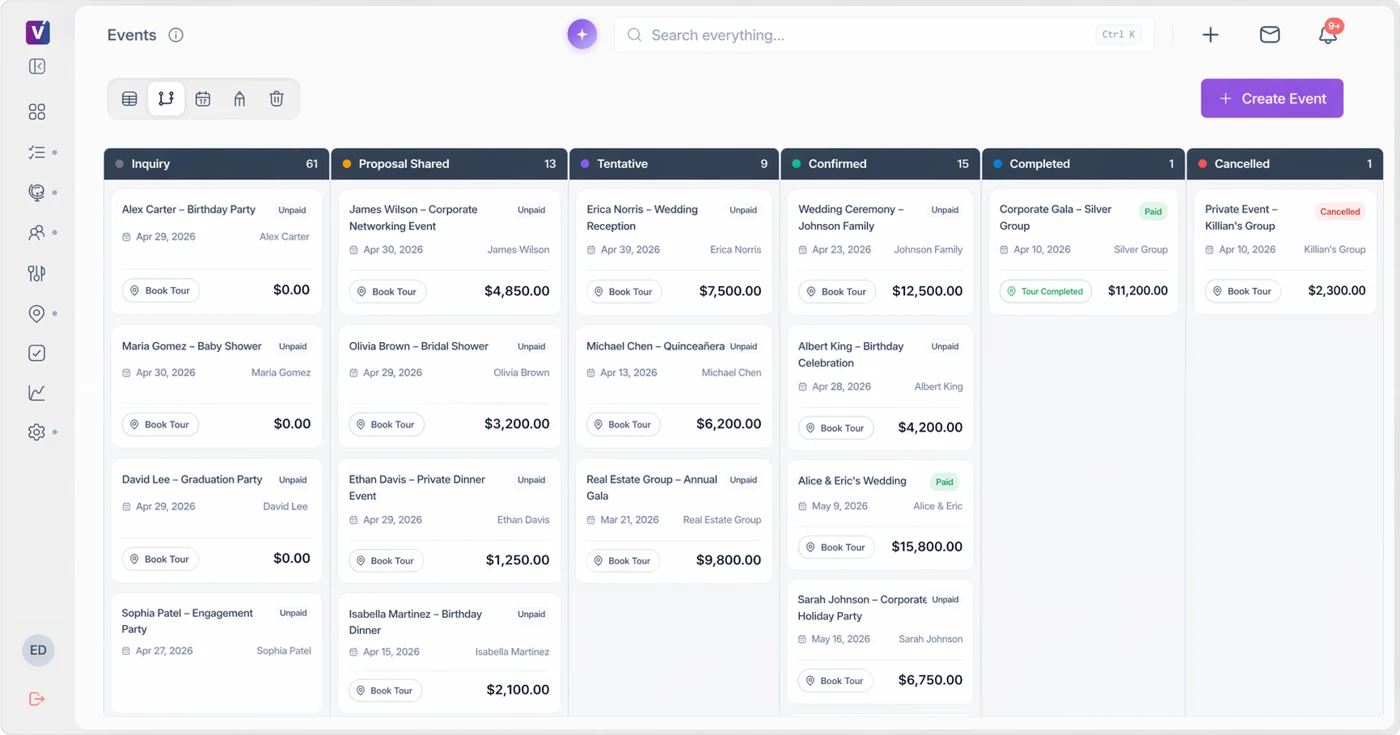
Give sales and operations a shared view of inquiries, proposal progress, tentative bookings, confirmed events, and completed work.
A venue-focused CRM should make the next action visible while keeping the event context close to the client and booking record.
See the Venue CRMMonitor every opportunity from new inquiry to booked event without losing pipeline context.
Reduce lead leakage with reminders and structured response cadence for your sales team.
Track close rates and bottlenecks so managers can optimize performance with real data.
Many general-purpose systems can store contact records, but venue teams need CRM workflows tied directly to booking milestones, proposal stages, and contract decisions. When CRM data mirrors real sales operations, coaching and forecasting become much more reliable.
Use pipeline metrics to evaluate progress: lead response SLA, proposal acceptance rate, and average days to close. Use these measures to identify where work stalls; a change in the report is not a guarantee of additional bookings.
A venue CRM needs to connect the person asking with the event they want to book. An email address is only the beginning: the requested date, event type, guest count, venue space, proposal, and next action all affect the sale. Venuine’s event pipeline puts the opportunity’s stage beside its booking details so the team can distinguish new interest from agreed business.
The Venuine interface shown here separates Inquiry, Proposal Shared, Tentative, Confirmed, Completed, and Cancelled events. A stage tells staff where the opportunity stands; the card’s payment status and next action add different information. Your venue should decide which agreement and deposit conditions make a booking confirmed. Do not use a tentative stage as a promise that an event is secured.
For a wedding inquiry, record the date, space, guest count, and the person who will respond. After the tour, prepare the package proposal and keep the next action clear. When the client proceeds, follow the contract and payment steps into the event record. Staff can then review the stage alongside what still needs attention.
A calendar answers when and where. A CRM tracks the sales relationship and next action. The proposal sets out the offer, while payment status shows the financial milestone. Those jobs overlap, but they are not interchangeable. A venue-specific workflow connects them around an event, rather than asking staff to match a contact in one tool with a booking in another.
Compare the booking workflow, proposal builder, and payment tracking with your current process. Confirm the actual integration requirements before replacing a general CRM your business already uses.
Perfect Venue, Tripleseat, Planning Pod, and Releventful also document sales and event workflows. Use the detailed comparisons to check audience, plan limits, room design, billing, and setup. Venuine’s active public plans list three users; that matters when comparing tools that advertise unlimited seats. A lower entry price does not establish that a platform covers your whole team.